Jeep®
- 4.7
- Rating
- 500.00K
- Installs
- Free
- Price

 Analysis by App-foxy
Owning a Jeep often means dealing with more than the drive itself: remembering maintenance, checking the owner’s manual, finding help when something feels wrong, and keeping vehicle information close when you are away from home. I tested Jeep® as a companion for that ownership routine, and I found its value is less about entertainment or discovery and more about reducing the small bits of friction that appear before, during, and after a trip.
This is a free lifestyle app from FCA US LLC, aimed at Jeep owners rather than casual automotive shoppers. It is available for Everyone, so its presentation is approachable, and the current version is 1.99.701. With a 4.7 average from around 16 thousand ratings and more than 500 thousand installs, it has clearly found an audience among people who want a digital reference point for their vehicle.
How the app fits into a real Jeep ownership routine
I find this kind of owner-focused app most useful when it becomes part of a calm routine, not something I first open in the middle of a stressful warning or roadside problem. I would set aside a few minutes before a trip to make sure I can reach the vehicle information I may need, then use that familiarity to keep later questions simple. That practical rhythm also helps clarify where convenience ends and reliability begins.
You May Also Like

 Blood Strike: 2.5 Anniversary
Blood Strike’s Loadouts Turn Every Drop Into a Tactical Gamble
A close look at Blood Strike’s custom loadouts: how fast access to signature weapons reshapes its battle royale rhythm, rewards preparation, and narrows the gap between fights.

 Pandora - Music & Podcasts
Pandora’s Music Is Easy to Start, but Harder to Recover
Pandora’s strength is its low-effort path from a seed to a station. Its weak spot is how much confidence it asks you to place in connection, setup, and quiet recovery.

 8 Ball Pool
 Is Built on Rivalries, Rematches, and Routine
A close look at the rivalries, rematches, shared routines, and unanswered safety questions that turn a quick pool match into a persistent mobile community.

 Samsung Music
’s Quiet Strength Is Playing What You Already Own
Its reach comes less from spectacle than from dependable access to a personal library. That simplicity is both the app’s strongest retention engine and its ceiling.

 AccuWeather: Weather Radar
AccuWeather Review: A Quick, Clear Forecast for Everyday Decisions
For everyday plans, the best forecast is the one you can understand quickly. AccuWeather makes rain timing, radar, and local conditions easy to act on, with a few trade-offs.

 Hill Climb Racing
Why Hill Climb Racing Still Turns Crashes Into One More Run
A tiny car, a bumpy hill and one more upgrade: Hill Climb Racing keeps resurfacing because its simple chaos makes every near-miss feel personal.
More From Our News Desk



Starting with a problem instead of browsing aimlessly
The most useful way to approach the app is to open it with a specific ownership task in mind. I would not launch it expecting a broad social feed, a general car-shopping tool, or a replacement for every service conversation. Its strongest role is more practical: start with your Jeep, identify what you need, and use the relevant information to decide what to do next.
A realistic example is preparing for a weekend trip. Before leaving, I might want to check a vehicle detail, look up a warning symbol, review a maintenance-related instruction, or confirm what a control does. Instead of searching the web with a vague phrase such as “Jeep light on dashboard,” the owner-focused design gives me a more sensible starting point. The vehicle context matters because the same symbol or control can mean different things across models and equipment levels.
That model-specific starting point is also the first important tip: set up the app with the exact vehicle information before you need it. An owner who waits until a warning appears on a rainy roadside is already accepting unnecessary friction. Preparing the app at home makes the later workflow faster and reduces the chance of confusing one Jeep configuration with another.
Moving from vehicle identity to useful information
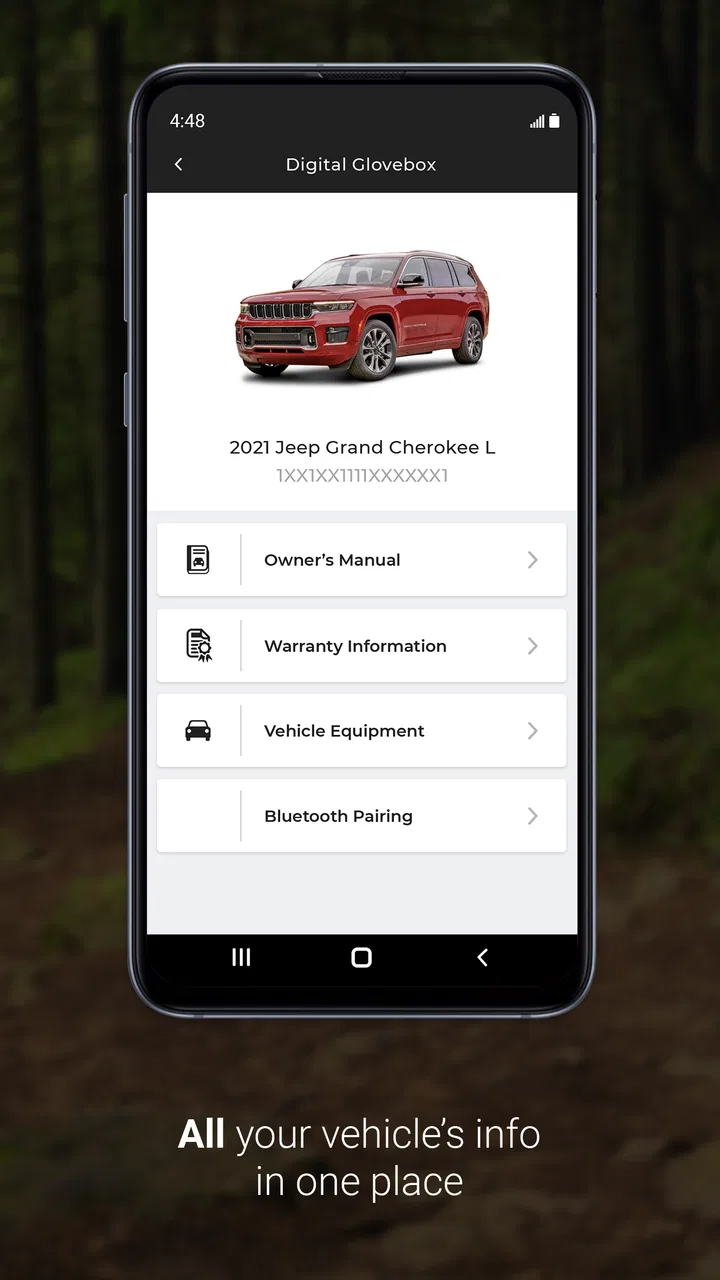
Once the vehicle is identified, the experience becomes more focused. I found that the app makes the most sense when treated as a digital glovebox. A physical manual can answer many questions, but it is rarely beside me when I am standing in a parking lot or sitting in the driver’s seat. A phone-based reference is easier to reach, search, and consult at the moment a question appears.
The benefit is not simply having information on a screen. It is the relationship between the question and the vehicle. If I am trying to understand a control, I want guidance that belongs to my Jeep, not a generic explanation copied from a different trim or model year. That distinction is especially valuable for owners who have recently bought a used Jeep, changed vehicles, or are still learning which features their particular configuration includes.
I also recommend using the app during a calm, stationary moment rather than trying to learn it while driving. It is tempting to reach for the phone when a dashboard message appears, but safe use means pulling over first. The app can support a decision; it should not become a distraction while the vehicle is moving.
Turning a question into an action
The next step is where the app becomes more than a manual viewer. Information is useful only if it helps me choose an action: continue carefully, inspect something when parked, arrange service, or speak with someone who can diagnose the issue properly. The app can provide the first layer of understanding, but it does not remove the need for judgement.
For example, if I see an unfamiliar indicator, I can use the app to understand what the symbol relates to before calling a service location. That preparation improves the conversation. I can describe what appeared, explain what I already checked, and avoid wasting time asking a vague question. This is one of the less obvious strengths of an owner-specific app: it helps create a shared vocabulary between the driver and the person handling the vehicle.
My advice is to capture the exact wording or symbol before leaving the screen. Even when the app explains the issue clearly, memory can blur details by the time I reach a service desk. A quick note, taken while parked, makes the handoff cleaner. The app is most effective when it supports that sequence rather than being treated as the final authority on every mechanical concern.
Where the handoff happens
Vehicle ownership rarely ends inside an app. At some point, information passes to another person: a service adviser, a family member borrowing the Jeep, a roadside helper, or a technician. The app’s owner-centered structure can make that handoff easier because I can consult the same vehicle information before explaining the situation.
Imagine lending the Jeep to a relative who has never used its controls. Instead of giving a rushed explanation in the driveway, I can use the app as a reference while showing the relevant function. That is more practical than sending the person to search through unrelated videos, where the vehicle shown may have a different layout. It also lets me answer the immediate question without pretending to be an expert on every feature.
For service conversations, I would use the app as preparation, not as proof that a repair is or is not required. A description in an owner resource can explain a warning or operation, but a real diagnosis may still depend on inspection. That boundary is important. The app helps me arrive informed; it does not turn a phone into a diagnostic tool.
There is another useful handoff: from the current owner to the future owner. When selling or transferring a Jeep, having the official owner resource available can help the next driver learn the vehicle more quickly. It is a small advantage, particularly when the new owner is unfamiliar with Jeep controls or has bought a used vehicle without a complete paper manual.
The outcome after the task is complete
In the best-case workflow, I open the app with a question, locate information connected to my Jeep, understand the immediate implication, and leave with a sensible next step. That outcome sounds modest, but it solves a real ownership problem. I spend less time guessing and less time searching through generic automotive pages that may not match my vehicle.
The app is also useful for building confidence over time. A new owner may initially need help with basic controls, while an experienced driver may use it only when a less familiar message appears. In both cases, the value comes from having a dependable reference available before turning to a broader web search or making a service call.
I would describe the result as better preparation, not complete vehicle management. That distinction keeps expectations realistic. The app can make routine ownership questions easier, but it does not replace maintenance records, a qualified technician, emergency services, or careful attention to the vehicle itself.
Where the flow breaks down
The first point of friction is the need to establish the correct vehicle context. That is sensible for accuracy, but it adds a setup step before the app can feel immediately useful. Someone who downloads it while standing beside a vehicle may find the opening process slower than simply typing a question into a search engine.
The second limitation is scope. If I want independent repair advice, comparisons between competing brands, detailed owner discussions, or a broad marketplace of accessories, this is not the natural destination. A web search or a dedicated automotive forum may offer more variety. Those alternatives can also expose me to conflicting advice, so the trade-off is breadth versus a more focused owner experience.
Another break occurs when the app’s information answers “what does this mean?” but my real question is “what should I repair first?” That decision depends on symptoms, vehicle condition, driving conditions, and professional inspection. I would not use the app alone to judge whether a vehicle is safe to drive after a serious warning, unusual noise, fluid leak, or collision.
Connectivity and phone habits can also affect the workflow. A digital manual is convenient when the phone is charged and the app opens smoothly, but a paper manual remains useful as a backup in situations where the phone is unavailable. I like the convenience of the app, yet I would not discard every other source of vehicle information simply because the official resource is on my phone.
Who will get the most from it
This app is a strong fit for Jeep owners who want official, vehicle-focused guidance close at hand. It is particularly helpful for first-time owners, people moving from another brand, families sharing one Jeep, and drivers who prefer checking an owner resource before calling a service department. It also suits owners of used vehicles who want a more organized starting point than a collection of random online searches.
It is less compelling for someone who does not own a Jeep or who wants a universal maintenance tracker covering several brands. It may also feel limited to drivers who already have a preferred mechanic, a complete manual collection, and no interest in consulting an official digital reference. In that case, the app’s convenience may not justify adding another tool to the phone.
Drivers who expect live navigation, a full trip planner, community discussion, or deep repair diagnostics should choose an app designed specifically for those jobs. The important comparison is not whether Jeep® does everything; it is whether its focused owner workflow is more useful to you than a general automotive app. For me, it is better at vehicle-specific orientation and basic ownership reference than a generic alternative, while broader tools remain stronger for discovery and independent advice.
Small habits that make it more useful
I would begin by exploring the app before a long journey, not during one. Check that the vehicle context is correct, look through the main owner resources, and become familiar with where common information is located. This turns an unfamiliar interface into a quick reference when time matters.
Next, use it as a conversation aid. If a warning or control creates confusion, read the relevant guidance while parked and write down the exact wording. Then pass that information to the service adviser or another driver. This simple step prevents the common handoff problem where an important detail gets reduced to “a light came on.”
Finally, keep its role clear. Use it for understanding, preparation, and everyday ownership questions. Escalate safety concerns, repeated warnings, and mechanical symptoms to an appropriate professional. The app is more trustworthy in my routine when I do not ask it to perform a job it was not designed to replace.
My recommendation after using it
Jeep® works best as an official digital companion for people who already have a Jeep and want a convenient way to orient themselves around that vehicle. Its free price removes the main barrier to trying it, and the Everyone age rating makes it easy to share within a household. The broad adoption and strong average rating suggest that many owners find this focused approach worthwhile.
I would recommend installing it early in the ownership process, completing the vehicle setup at home, and treating it as the first stop for model-specific questions. I would not recommend relying on it as a substitute for a mechanic, emergency help, or a complete maintenance system. Its honest strength is narrower and more useful: it turns the owner’s phone into a practical reference that can move a question from confusion to a better-informed next action.
For a Jeep driver who values that kind of preparation, the app earns a place alongside the keys and the physical documents. For someone seeking a universal car platform or a complete connected-driving experience, another option will likely be a better match. My final view is favorable because the app understands its most valuable job: helping the owner start with the right vehicle information and finish with a clearer decision.
FAQs for Jeep®
01What features does the Jeep® app offer?
The Jeep® app is packed with features designed to enhance your driving experience. It includes remote start, lock/unlock capabilities, vehicle health reports, and a detailed navigation system. Additionally, it provides access to service reminders, fuel level monitoring, and a comprehensive support section for troubleshooting and assistance.
02Is the Jeep® app compatible with all Jeep models?
The Jeep® app is compatible with most recent Jeep models, but it's always best to check the specific model year and trim compatibility on the app's official page. Generally, models equipped with Uconnect® services can fully utilize the app's features, but older models may have limited functionality.
03How secure is the Jeep® app in protecting my data?
The Jeep® app employs advanced security measures to protect your personal and vehicle data. This includes encrypted data transmission and multi-factor authentication options. Jeep continuously updates its security protocols to ensure that your information remains private and secure, aligning with industry standards.
04Are there any costs associated with using the Jeep® app?
The Jeep® app itself is free to download, but some features may require a subscription to Uconnect® services. Basic functionalities are often available at no cost, while premium features, such as advanced navigation and remote services, might require a subscription plan, which can vary in price.
05Can I use the Jeep® app offline?
Certain features of the Jeep® app, such as saved vehicle information and service history, can be accessed offline. However, functionalities like remote operations, live navigation, and real-time vehicle health updates require an active internet connection to function effectively. It’s advisable to ensure connectivity for the full range of features.
Pros
- User-friendly interface for easy navigation.
- Comprehensive vehicle information access.
- Real-time maintenance alerts and tips.
- Convenient service scheduling feature.
- Seamless integration with Jeep® vehicles.
Cons
- Limited functionality for non-Jeep® owners.
- Requires consistent app updates.
- Some features need internet access.
- Occasional sync issues with older models.
- Limited customization of app settings.

Jeep®
Gallery